I decided to buy a robot lawnmower because I have better things to do than mow the lawn. I opted for an orange one and stuck googly eyes on it and called it Timothy.
For the technically minded, he is WORX Landroid M WR141E Robot Lawn Mower for medium gardens up to 500m2. The older model that needs a guide wire. But older means cheaper.
Timothy does a good job. He does miss bits and I’ve had to repair the wire where he cut it himself a couple of times until it eventually got absorbed into the lawn.
He has two major challenges:
Holes
Apples
As he is powered by his rear wheels, if his front, free spinning swivel wheel hits a hole or mild depression in the lawn, he will either try in vain to get out and carve two trenches or he will assume as he is now 1 degree off the horizontal that somebody has picked him up and he needs to stop. Occasionally he will think he has moved, realise he can’t find the guard wire where he left it and must now be “outside the area” and also… stop.
Apples though are a major barrier to his mowing prowess. He will occasionally partial run one over and then declare he is trapped or will choose one of the random error types such as “I’ve been lifted”.
The app on the phone will warn of these disasters and allow you to run at pace across the partially-mown lawn and rescue the robot hero. But how do you get him moving again?
You can pick him up, put him back on his charger and he’ll reset.
Much quicker though to simply move him or the obstacle and then;
START START START OK
He’ll then head back on his mission.
I’ve not used a manual lawnmower since I got him. I have got the strimmer out to trim the odd bit here or there that he seems to avoid, but the effort of lawn maintenance has certainly reduced.
I decided to join the modern era and swapped a FireCuda “Hybrid” drive for a full fat NVMe disk. For those wondering what the performance differences are, let’s run a quick winsat:
Segate FireCuda 1TB
C:\Users\jhpsi>winsat disk -drive c Windows System Assessment Tool
Running: Feature Enumeration ” Run Time 00:00:00.00 Running: Storage Assessment ‘-drive c -ran -read’ Run Time 00:00:13.45 Running: Storage Assessment ‘-drive c -seq -read’ Run Time 00:00:09.02 Running: Storage Assessment ‘-drive c -seq -write’ Run Time 00:00:05.38 Running: Storage Assessment ‘-drive c -flush -seq’ Run Time 00:00:03.52 Running: Storage Assessment ‘-drive c -flush -ran’ Run Time 00:00:04.42 Dshow Video Encode Time 0.00000 s Dshow Video Decode Time 0.00000 s Media Foundation Decode Time 0.00000 s Disk Random 16.0 Read 1.60 MB/s 4.0 Disk Sequential 64.0 Read 166.32 MB/s 7.2 Disk Sequential 64.0 Write 173.37 MB/s 7.2 Average Read Time with Sequential Writes 3.872 ms 6.4 Latency: 95th Percentile 9.810 ms 5.7 Latency: Maximum 34.080 ms 7.9 Average Read Time with Random Writes 5.342 ms 5.9
WD Blue SN550 NVMe SSD 1TB
C:\Users\jhpsi>winsat disk -drive c Windows System Assessment Tool
Running: Feature Enumeration ” Run Time 00:00:00.00 Running: Storage Assessment ‘-drive c -ran -read’ Run Time 00:00:00.77 Running: Storage Assessment ‘-drive c -seq -read’ Run Time 00:00:03.16 Running: Storage Assessment ‘-drive c -seq -write’ Run Time 00:00:01.81 Running: Storage Assessment ‘-drive c -flush -seq’ Run Time 00:00:00.39 Running: Storage Assessment ‘-drive c -flush -ran’ Run Time 00:00:00.38 Dshow Video Encode Time 0.00000 s Dshow Video Decode Time 0.00000 s Media Foundation Decode Time 0.00000 s Disk Random 16.0 Read 350.82 MB/s 8.1 Disk Sequential 64.0 Read 2083.30 MB/s 9.1 Disk Sequential 64.0 Write 2118.63 MB/s 9.1 Average Read Time with Sequential Writes 0.066 ms 8.9 Latency: 95th Percentile 0.219 ms 8.9 Latency: Maximum 0.606 ms 8.9 Average Read Time with Random Writes 0.067 ms 8.9
This is the WD “Blue” variant which is inexpensive and still a massive improvement over spinning platters and standard SSD. there are versions by the usual vendors that promise 3-4 times the speed of the one I use, but you pay a premium.
My advice is that you make NVMe a must-have when shopping for your next motherboard. For reference, my board is a humble MSI B450M PRO-VDH MAX.
The nice people at TFL publish a free API to get status information. I had a few minutes spare today and decided to use it to push the info through Alexa. There are lots of clever ways to do this but I wanted to just throw something together in PHP and crontab as this doesn’t need to be a robust, industrial-scale thing, just a little quick-and-dirty test.
First thing was to get an account on VoiceMonkey and add the VoiceMonkey skill to Alexa. That should not need a walkthrough, so go do that, add a Monkey called (for example) “TFLRailStatus” and you will end up with a “virtual doorbell” in Alexa with that name.
Now create a routine in Alexa based on the “TFLRailStatus” doorbell being the trigger (under smarthome) and set the action to announce using the Voice Monkey skill and choose your target Alexa device.
Use the dashboard to get the URL required to call this Monkey as you then only need to change the actual text.
Now we need something that can call the new Monkey and thus tell Alexa to say something. The crude method is to search for “statusSeverityDescription”: and scrape the following text strings
"statusSeverityDescription":"Minor Delays","reason":"Minor delays between Liverpool Street and Shenfield due to a reason. GOOD SERVICE on the rest of the line. "
I did it with a bit of horrid PHP. Please don’t judge me. Employ your own flair to make this better before you do anything serious with it, but it will be enough to test the monkey and push a message out of Alexa:
What this does is extract the header and description and if it is a good service, says so, otherwise it posts the delay description using the Voice Monkey URL. You could obviously use a better technique to extract the text but as I said above, I’m just chucking out what I get.
Point your web browser as this new PHP page and Alexa will tell you how the service is.
Add a crontab entry to curl that page and Alexa can give you your morning TFL briefing. All done with very little code.
sudo crontab -e

# m h  dom mon dow   command
15 7 * * 2,3,4 curl http://127.0.0.1/tflrailstatus.php
** UPDATE – From May 24th 2022, the mode name changed from “tflrail” to “elizabeth-line” and in truth the name “TFL Rail” no long applies, so amend your code appropriately. The code segment above has the new mode name in it so will work as is.
In my occasional jaunts into the realms of piracy and at the odd shanty singing event, I have encountered a number of variants of the song “Spanish Ladies”. It is a naval song from the era of the Peninsula Wars allegedly sung by British sailors with little or no knowledge of the geography of the English coast. So here are what I think the correct words should be. I am sure almost nobody will agree but if you haven’t adopted a favourite version yet, hopefully this is a contender.
Why are the Ladies Spanish? During the War of the First Coalition (1793–1796), Britain supported Spain’s land forces using its dominant Navy. This meant inevitably that those lowly ratings found themselves ashore in Spanish holdings for months at a time. Many no doubt found comfort in the arms of a local girlfriend, wife or dare I say it, women of negotiable virtue.
[Verse 1]
Farewell and adieu to you, Spanish Ladies
Farewell and adieu to you, ladies of Spain;
For we've received orders for to sail for old England
But we hope very soon we shall see you again
[Chorus]
We'll rant and we'll roar like true British sailors
We'll rant and we'll roar across the salt seas
Until we strike soundings in the channel of old England;
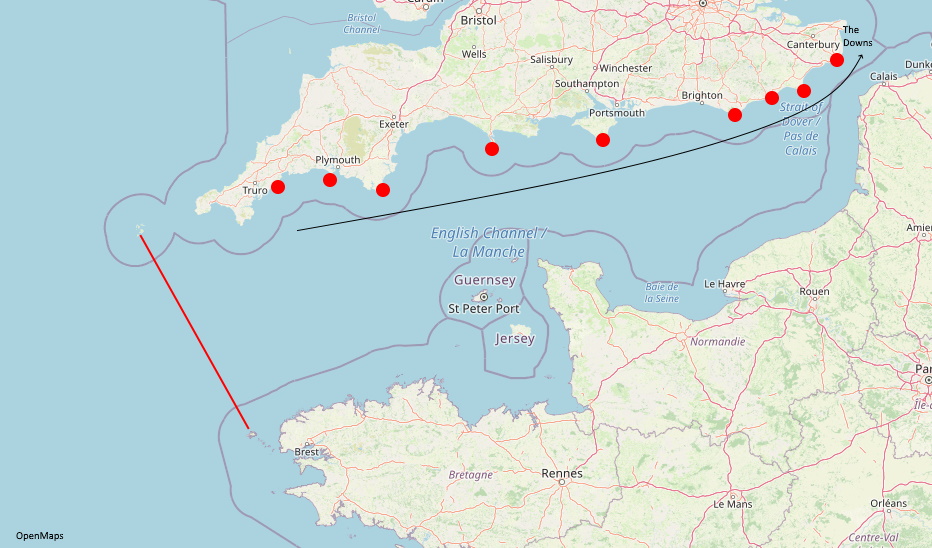
From Ushant to Scilly is thirty-five leagues
So let’s take a break here and cover the first contentious bit: How many (British) leagues is it from Ushant to Scilly? It is 33 and a bit. 35 seems a fair approximation. Ushant is the last bit of land a ship sailing north would pass before getting into the English Channel.
[Verse 2]
We hove to our ship with the wind from sou'west, me boys
We hove to our ship deep soundings to see;
So we rounded and sounded and got forty-five fathoms,
So we squared our main yard and up channel steered we
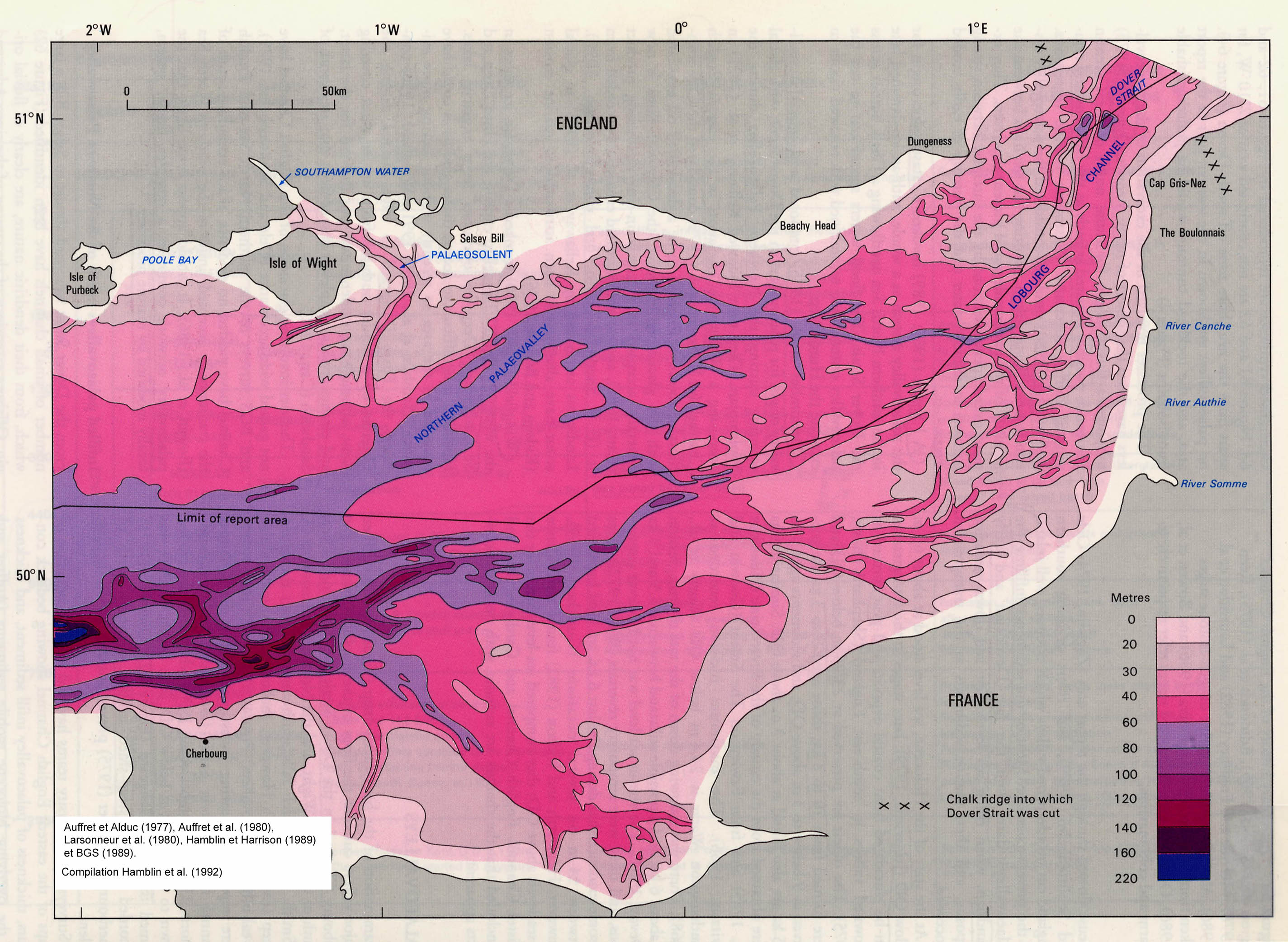
45 Fathoms is roughly 80m deep. The Channel itself goes as deep as 120m at the arbitrary line between Ushant and The Scilly (pronounced “Silly” not “Skilly”) Isles. 80m means the ship is sufficiently north that the depth is beginning to reduce, turning here makes sense if the plan is to head east along the length of the Channel.
[Chorus]
We'll rant and we'll roar like true British sailors
We'll rant and we'll roar across the salt seas
Until we strike soundings in the channel of old England;
From Ushant to Scilly is thirty-five leagues
[Verse 3]
The first land we saw was called the Dodman
Next Rame Head off Plymouth, Start, Portland and Wight;
We sailed by Beachy, by Fairlight and Dug'ness
Until we're abreast of the South Foreland light
OK then, what are all these places they are singing about here? Dodman, Rame Head, Start, Portland, Wight and Beachy are all easy enough to find on a map. But then there is a bit of disagreement if you pass Dungeness or Dover. Well looking at a map makes Dungeness or Du’gness the obvious candidate. The “South Foreland Light” is bang next to Dover too and thus the port itself hardly seems worthy of a mention as a navigational point.
[Chorus]
We'll rant and we'll roar like true British sailors
We'll rant and we'll roar across the salt seas
Until we strike soundings in the channel of old England;
From Ushant to Scilly is thirty-five leagues
[Verse 4]
Then the signal was made for the great fleet to anchor
And all in the Downs that night for to see;
Stand by your stoppers, See clear your shank painter,
Haul up your clew-garnets, let out tacks and sheets.
A few things to cover here. The Downs is both a hilly area in Kent and Sussex but more usefully is also an anchorage around the coast of Kent near Deal, just north of the lighthouse we mentioned earlier.
The Shank Painter is a short rope or chain which holds the anchor to the side of the ship when at sea. The cat stopper is also a device for securing the anchor. So this is basically saying, to drop anchor.
A Clew-Garnet is a rope attaching to the lower triangular corner of a sail (clew). A tack is a square sail (or square corner of a sail) and a sheet (confusingly to land-lubbers) is the rope the holds it by the corners. Letting out the tacks and sheets takes the wind out of them and slows the ship.
[Chorus]
We'll rant and we'll roar like true British sailors
We'll rant and we'll roar across the salt seas
Until we strike soundings in the channel of old England;
From Ushant to Scilly is thirty-five leagues
[Verse 5]
Now let ev'ry man toss off a full bumper
And let ev'ry man toss off a full bowl
We'll drink and be jolly and drown melancholy
And here's to the health of each true-hearted soul
A “full bumper” was a mug or glass full to the brim with beer or grog. A “full bowl” would be dinner. Tossing off meant to simply finish eating/drinking with enthusiasm.
[Chorus]
We'll rant and we'll roar like true British sailors
We'll rant and we'll roar across the salt seas
Until we strike soundings in the channel of old England;
From Ushant to Scilly is thirty-five leagues
If you own a Land Rover, especially a Series or Defender and live around London, you will have had to grapple with the Congestion Charge, LEZ and ULEZ. No doubt you have jumped around the TFL site to try and work it all out. Well, I thought I’d selfishly gather together the useful bits for people like me.
What are the Three Zones?
The Congestion Charge is the charge for driving in the very centre of London. It can always be avoided unless you actually need to go to somewhere inside it. It is clearly signposted where the charge begins and operates:
07:00-18:00 on weekdays
Not on Bank Holidays, weekends or between Christmas and New Year
All vehicles are affected, it costs £10 per day and you can set-up “Auto-pay” to save you having to remember to pay it.
The Ultra-Low Emission Zone covers the same area as the Congestion Charge Zone (orange bit) but will expand from 25th October 2021 (yellow bit) to be the inside of the North and South Circulars. The charges apply:
24 hours a day
Except Christmas Day
ULEZ costs £12.50 for most vehicle types, including cars, motorcycles and vans (up to and including 3.5 tonnes) and £100 for heavier vehicles, including lorries (over 3.5 tonnes) and buses/coaches (over 5 tonnes) that don’t meet the strict ULEZ standards. For Land Rovers, that means being Euro4 for petrol and Euro6 for diesel. You won’t be if your car is older than about 2005. So you’ll be paying the £12.50.
The Low Emission Zone covers everywhere inside the M25, but not the M25 itself. It operates:
For the Land Rover specific section of the rules, look here.
For Land Rover owners that consider they own a “car”, you may be surprised to learn that you instead own a “4×4 Utility” vehicle, which is NOT exempt. Check your V5C certificate to see what it says. If it is an “Estate Car”, it was a County Station Wagon or CSW when it left the factory and you are fine. Check your reg here to be sure.
If your car chassis number indicates it is a CSW AND it still has the side windows and seats, you can get a V5C corrected by writing a nice letter to the DVLA, then follow up with a similar one to TFL to ask them to amend their records.
If your car was retro-fitted with seats and side windows, you still own a “4×4 Utility” and will be liable for the charge. That’s why van-bodied Defenders are cheaper than CSW ones around London. If you are shopping for a new Defender,check the chassis number and V5C.
So what does this mean?
I recommend checking for yourself but basically:
CSW Drivers:
If you drive inside the M25 in a correctly-listed CSW, you don’t pay anything until you hit the ULEZ.
If you drive inside the North/South Circular after 25th October 2021, you pay £12.50 ULEZ
If you drive inside central London, you also pay £10 congestion charge
Non-CSW Drivers:
If you drive inside the M25 you pay £100 LEZ charge.
If you drive inside the North/South Circular after 25th October 2021, you also pay £12.50 ULEZ
If you drive inside central London, you also pay £10 congestion charge
For all the above there are various exemptions such as LEZ exemption for vehicles older than 1973.
Beg, borrow or steal an external Hard Drive that you can store a backup of your current drive
A blank CD (yes! CD-R is fine) or USB key
Backup:
Connect the external USB Hard Drive.
Hit the Windows Key and type “System Image” choose “Backup Settings” when it suggest it
Under “Looking for an Older Backup?” click “Go to Backup and Restore (Windows 7)”
In the left-hand menu choose “Create a system image”
Choose the location of your external USB drive and let the image be created. It will take a while….
When it completes it offers to create a Windows Repair disk. Do it! (use the CD-Rom or USB Key)
Shutdown
Unplug your old hard drive
Plug in your new one
Boot from the Repair disk
Under Advanced, choose Restore from System Image. It will take a while….
Remove the External drive, Eject the Windows Repair disk/key
Reboot!
Note: If you need to resize your hard disk partition, you might need some software for that depending on your disk type. Rather than buy something look up “Ultimate Boot CD” and use one of the free tools on that.
Note: Sometimes the recovery disk gets you to a screen that reads “Choose your keyboard layout” and doesn’t respond to you beating the keyboard. Your best bet is to try a different boot method. Go here https://www.microsoft.com/en-gb/software-download/windows10 and download the media creator to make a USB stick to install Windows on another computer. When you get to the screen with the language selection, choose the REPAIR link and follow it from there.
then you are being targeted by spammers looking to fill your blog with spam comments or to generate response emails to random endpoints, which in turn keeps your mail server busy.
Trackbacks are useful in theory but I find they generally just get abused and turn them off. I had overlooked it on my current WordPress instance but this post is the most thorough set of instructions to remedy it… http://www.wpbeginner.com/wp-tutorials/how-to-disable-trackbacks-and-pings-on-existing-wordpress-posts/
Hold down the On/Off button and the Home button at the same time for at least ten seconds. Release both when the Apple logo appears.
You won’t lose your photos, apps or settings. It is just like doing CTRL-ALT-DEL on a PC.
If you have upgraded to IOS7 recently, you’ll have to do this at some point when you start to see Facebook crashing or the camera refusing to take pictures. Once you’ve reset, all will be well again.
I’ve recently run some more cat6 cable around the house and realised I’d be running a telephone extension and a network cable side-by-side up the stairs. This seemed a bit daft to me so I dusted off my cabling knowledge and decided to break the IEEE standards (what do they know!) and save myself a bit of effort.
The basic principle goes something like this:
So you are trying to use the Snipping Tool and when you click New Snip, the screen goes black. Bummer.
I bet you have a web-browser open. I bet you do on-line banking.
Programs – Trusteer Rapport
Rapport Console
Green Arrow
Edit Policy
Type in the magic code
Change the first setting in the list tot “Never” and click Save.